Showing posts with label Digipak and poster. Show all posts

Saturday, 14 March 2015

Digipak and Poster


It was suggested to make minor changes to my digipak and poster. For my poster I needed to take out 'out now' and remove the front cover for the digipak, as it was thought that this image was strong enough as a front cover and should be changed from the original.


Wednesday, 14 January 2015

New Poster


This is my new poster after the feedback that was given.

With the digipak track listing I think that it isn't hard to read. I also think that when they refer to the title of the album being hard to read, I think it is due to the layout.

Tuesday, 9 December 2014

Poster (Date placement)


I have tried playing around with the placement of the date on the poster, however I don't think it is as aesthetically pleasing in the original poster. I think it stands out in the centre and is more obvious for the audience, however I will get some feedback.

Tuesday, 2 December 2014

Poster Draft 2


I really like this poster, I think it's a lot more clearer than my previous one and shows audiences where they can buy the music and the social media websites the band can be followed on. I'm not too sure about the logos of where people are able to buy the music as it is not as clear to read the 'amazon prime' logo. 

3rd Draft of Digipak


For my USP I have decided that I want an inserted page that offers customers a 30% discount to the officialsymptom.com merchandise.

I think my digipak feels stronger as there is a key theme running throughout

I also decided that I want my cd to be a cracked mirror as this would relate to my music video, which is the first song on the digipak and ties in the the crackled/ broken glass font I have used for the title.

Digipak Feedback

This is the feedback I got from the class after presenting my most recent draft for my digipak. Overall the feedback I got was to make my whole album grayscale and to retake the pictures that didn't fit the genre. The class also thought I should change my track listing cover to grayscale also. My next step is to complete all these changes and think about what my USP (unique selling point) is of my digipak and how I want to promotional poster to look.


Friday, 21 November 2014

Production Log 23/11/14

I went out and took photos for my digipak.

I think I have more variety of images here that can be incorporated into my digipak. I need to edit my favourites and the ones I think will work for the digipak and then add them to it.

(click thumbnail to see all photos)

Friday, 7 November 2014

1st Digipak Draft


(Click thumbnail for photos)

This lesson I was playing around with my digipak on photoshop. This is what I have come up with so far.


Friday, 24 October 2014

From 1st photo shoot - Edits

https://www.flickr.com/photos/lozzietheunicorn/sets/72157650965314959/

This are my favourite photos from the shoot, edited.

Thursday, 23 October 2014

Poster Plan

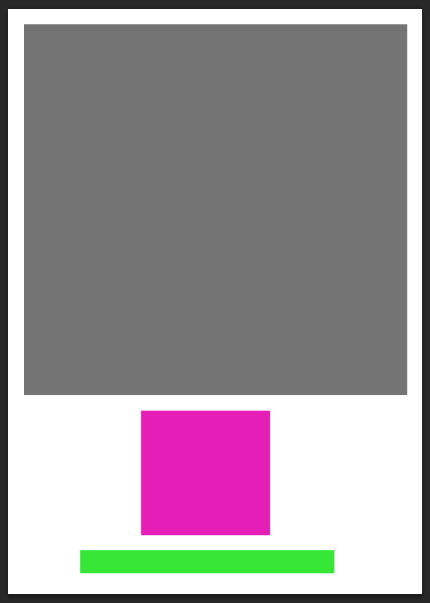
 I really want a simple poster; as a new band they wouldn't have huge billboard posters, and as a niche genre they wouldn't have as much money as a band/artist in the pop genre.

I am unsure as to whether I want a plain white or black background. The white suggests indie whereas the black suggest rock.

The grey blocks are to show a black and white image of the band. The pink box is where I want the album cover to be. The green box is where I want the information/ date of release.

Conventions for Digipak

The conventions of a digipak of the Rock genre would include:


  • Photo of the audience
  • Photo of band in studio
  • dark/ gore iconography
  • arty front cover
  • track listing
  • relevant font for the genre
  • Monochrome colours
  • Red

The conventions of a digipak of the Indie genre would include:

  • Black and white photos of the band
  • Artsy cover
  • Sepia/ monochrome imagery
  • track listing
  • relevant font for the genre

The conventions of a digipak of the Electronic genre would include:


  • Purple/blue tones
  • Neon colours
  • lights
  • live audience
  • live performance
  • photo of band in studio
  • obscure front cover image
  • bold font


Tuesday, 21 October 2014

Test Shots

https://www.flickr.com/photos/lozzietheunicorn/sets/72157650965314959/

(click the link to see all photos)

These pictures are test shots for my digipak. I like the photos where i have used depth of field. I plan to edit these photos like in the plan for my digipak. Perhaps I could use these photos to create a lyric book?

Tuesday, 14 October 2014

Digipak plan and stuff


This is my digipak plan (so far).

1. (Pink circle with lines through it) I plan to have the band members face aligned and edited with a neon colour scheme for the front cover.
2. (The green and grey thing with grey blocks) This is the back cover, the grey block represent track listing. I plan to have a landscape image with the image of the band faded into it. 
3. (the sound board) To represent the electronic side, I plan to have an image of the studio/ instruments/ sound board. 
4. (The audience) I want an image of a live performance/ audience to represent the rock/ indie genre, but also the neon lights to show electronic. I think this will work well since there will be a dvd accompanying the cd within the digipak. 
5. (The question mark) I am unsure what to put there as of now. 
6. (They grey circle) A Chiaroscuro image of the band - shows them as a brand. 


I tried another generator - which I don't really like. 


I found this font on dafont, which I would like to try.